Overview
This page introduces the workflow functionality of JOSYS.
The workflow is a mechanism enabling the automation of various processes performed within JOSYS.
Templates are pre-configured, utilising them can streamline repetitive tasks such as onboarding, offboarding, and application requests, while also enhancing security and compliance.
Intended Audience
- JOSYS administrators handling new employee onboarding or offboarding
- JOSYS administrators responsible for application access rights requests and approval workflows
- JOSYS administrators seeking to streamline organisational security and licence management
Purpose
- To standardise and automate the often cumbersome process of employee onboarding and offboarding
- To streamline application requests and licence management
- To reduce Shadow users and underutilized licences, thereby optimising security and costs
Screen description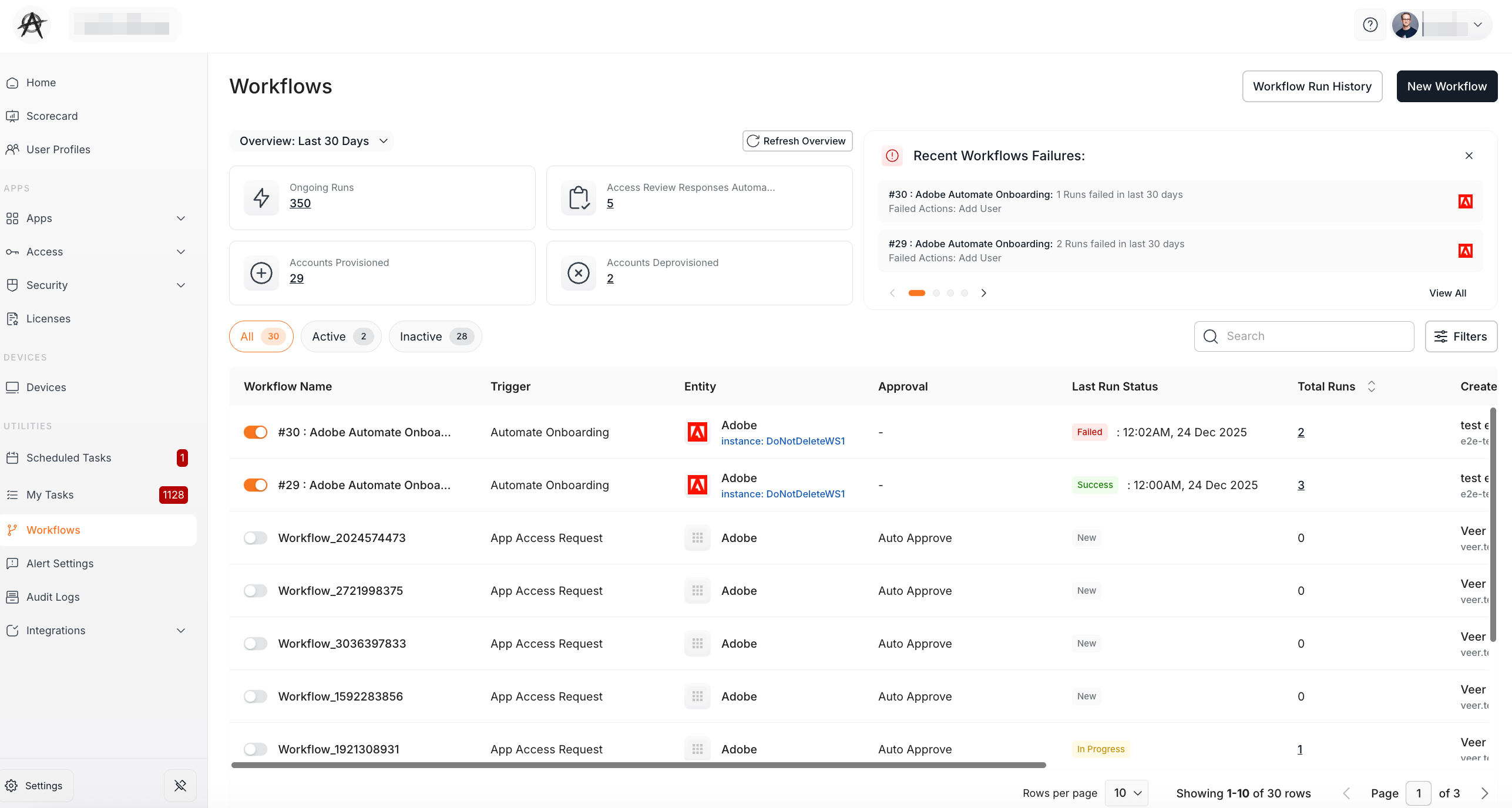
| Field Name | Description |
|---|---|
| Workflow Name | The workflow name. |
| Trigger | The workflow template name. |
| Entity | The services and applications set by the workflow will be displayed. |
| Approval | The settings configured on the “Approval” screen when creating the workflow will be displayed. |
| Last Run Status | The most recent workflow execution result is displayed. |
| Total Runs | The total count of workflow has been executed. |
| Created by | The user who created that workflow. |
| Created on | The date the workflow was created. |
| Last Edited by | The user who last edited the workflow. |
| Last Edited on | The date the workflow was last edited. |
Available Templates
-
Automate Onboarding
When specific applications must be assigned to new hires upon joining, this template will automatically issue accounts for those applications to the new members. -
App Access Request
You can use this workflow template for access request submission and approval. This streamlines employee access requests. -
Automate Off-boarding
Automatically remove application access for off-boarding employees, ensuring security while reducing manual effort -
Shadow User Detection
Automatically detect unauthorised or untracked accounts to mitigate security risks. -
License Optimization
Monitor account usage to reclaim or reassign underutilized licences, reducing costs and improving efficiency. -
Automate Access Review
Automate app inventory actions based on responses from users or app owners.
How to create a workflow
The configuration details vary depending on the template. For further details, please refer to the pages below.
- Create an Automated Workflow for Onboarding
- Create an Automated Workflow for App Access Request
- Create an Automated Workflow for Off-boarding
- Create an Automated Workflow for Shadow Users
- Create an Automated Workflow for License Optimization
- Create an Automated Workflow for Access Review
Frequently Asked Questions
Q: What time zone is the execution date and time stated in the “Workflow executed” email based on?
A: Currently, it is displayed in Coordinated Universal Time (UTC). As of 10 October 2025, we are in the process of adjusting this to Japan Standard Time (JST).
Q: Can I edit a workflow after saving it?
A: Currently, only the conditions and actions can be edited. Therefore, if you wish to add an app to an existing workflow, you will need to create a new one.
Q: Is there a function to duplicate workflows?
A: Currently, it is not supported.